







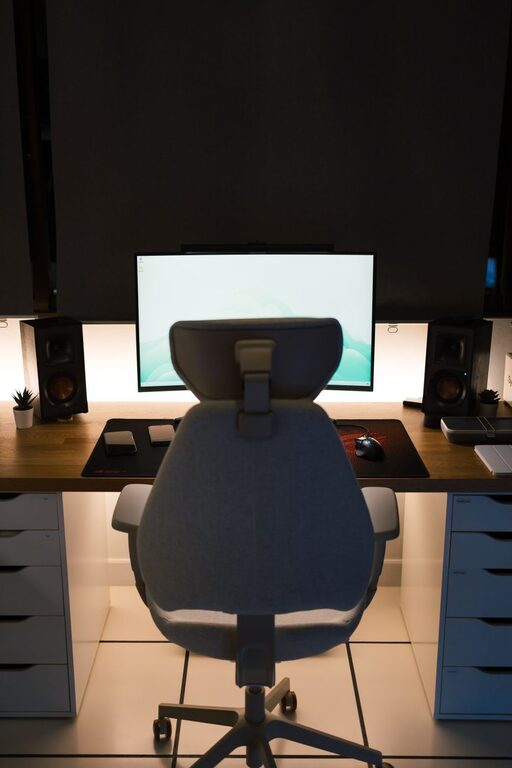
Working from home can make everyday online tasks more convenient, but your surroundings have a major effect on how easy those tasks feel. A well-planned workspace can help you stay focused, reduce distractions, and move comfortably through emails, video calls, online learning, and personal projects.
Creating a useful home workspace does not require a large room or expensive equipment. With a few thoughtful choices, you can turn a small corner into a practical area that supports your daily routine.
Choose the Right Location
Start by deciding where your workspace will be located. If you have a separate room available, it may be easier to create a quiet area. However, a desk in a bedroom, living room, hallway, or dining area can work just as well when arranged carefully.
Consider these factors:
– Noise: Choose a location away from televisions, busy walkways, and other common distractions.
– Lighting: Look for natural light when possible, but avoid placing your screen where sunlight creates glare.
– Space: Make sure you have enough room for your computer, notebook, and other frequently used items.
– Access to power: A nearby outlet can help reduce cable clutter and avoid the need for long extension cords.
– Background: If you join video calls, select a tidy and uncluttered area behind you.
Your ideal location may change depending on the task. A quiet desk may be best for focused work, while a comfortable chair in a shared room may be suitable for reading or casual browsing.
Select a Desk That Fits Your Needs
A desk should give you enough room to work without making the space feel crowded. Before buying one, measure the area and consider the equipment you use most often.
A basic desk may only need space for:
– A laptop or monitor
– A keyboard and mouse
– A notebook or planner
– A lamp
– A drink or small personal item
If you use more than one screen, write by hand, or work with printed documents, choose a larger surface. A compact desk can still be effective if you use shelves, drawers, or wall storage to keep extra items out of the way.
The desk height should allow your arms to rest comfortably while typing. If the surface feels too high or too low, you may be able to improve comfort with an adjustable chair, a monitor stand, or a keyboard tray.
Focus on Comfortable Seating
A good chair is one of the most important parts of a home workspace. You should be able to sit with your feet supported and your shoulders relaxed.
Look for a chair with:
– Adjustable height
– A supportive backrest
– A seat that allows you to sit comfortably
– Stable armrests, if needed
– A surface that is easy to clean
Your feet should rest flat on the floor or on a small footrest. Keep your screen near eye level so you do not need to bend your neck forward for long periods. If you use a laptop, a stand combined with a separate keyboard and mouse can make it easier to position the screen correctly.
Even with a comfortable chair, avoid staying in the same position for too long. Stand up, stretch, or walk around regularly to refresh your body and attention.
Improve Lighting and Screen Comfort
Lighting can make a major difference in how comfortable your workspace feels. A room that is too dark may make your screen feel harsh, while bright light directly behind or in front of the screen can create reflections.
Try these simple adjustments:
– Place your desk near a window, but position the screen at an angle to the light.
– Use a desk lamp for reading and writing.
– Choose a lamp with adjustable direction so you can aim light where it is needed.
– Avoid placing a bright lamp directly behind your screen.
– Adjust your screen brightness to match the room.
A warm, soft light can make an evening workspace feel more inviting. During the day, natural light may be enough, especially when combined with general room lighting.
Organize Your Technology
Technology should make online tasks easier, not create a tangle of cables and misplaced accessories. Keep the devices you use most often within easy reach and store less frequently used items elsewhere.
Useful organization ideas include:
– Use cable clips or ties to group charging cables.
– Label similar cords so you can identify them quickly.
– Store headphones on a hook or stand.
– Keep a charger in one consistent location.
– Use a small tray for USB drives, adapters, and other accessories.
– Place a power strip where it is easy to reach but not in the middle of the floor.
A clean setup is also easier to maintain. At the end of each work session, return accessories to their usual locations and remove items that do not belong on the desk.
Build a Simple Storage System
Clutter can make it harder to begin a task. Instead of trying to organize everything at once, create a simple system for the items you use regularly.
Use drawers, boxes, shelves, or baskets to separate supplies into groups such as:
– Writing tools
– Paper and notebooks
– Technology accessories
– Mail and documents
– Personal items
Keep everyday essentials close to your chair. Store occasional-use items farther away. If your workspace is in a shared room, choose storage that can be closed or moved easily so the area can serve other purposes when needed.
A small “inbox” tray can also be helpful. Place papers or items that need attention there, then review the tray at a set time rather than allowing them to spread across the desk.
Create a Focus-Friendly Environment
Comfort is not only about furniture. The sounds, visuals, and habits around your workspace can also affect your ability to concentrate.
Consider using:
– Headphones for background sound or calls
– A simple wall calendar or task list
– A plant or small decorative item
– A screen background that is easy on the eyes
– A room divider or curtain in shared spaces
Try to keep decorations intentional. A few items can make the area feel personal, while too many may become distracting. If household noise is unavoidable, schedule tasks based on the usual rhythm of your home. For example, you might complete focused work during quieter periods and handle routine tasks when the space is busier.
Use Helpful Daily Routines
A workspace works best when paired with consistent habits. Before starting, take a moment to prepare the area. Clear unnecessary items, fill your water bottle, and open only the tools you need.
A simple routine might include:
- Review your main tasks for the day.
- Set up your computer and accessories.
- Silence nonessential notifications.
- Work on one task for a planned period.
- Take a short break before beginning the next task.
- Tidy the desk when you finish.
Breaks do not need to be complicated. Stand up, look away from the screen, refill a drink, or walk around the room. These small pauses can help you return to your tasks with renewed attention.
Review and Adjust the Setup
Your workspace does not need to be perfect from the beginning. After using it for a week, notice what feels inconvenient. Perhaps the lamp is too far away, the chair needs adjustment, or commonly used items are stored in the wrong place.
Make one change at a time and observe the result. You may also need different arrangements for different seasons, schedules, or types of online tasks.
The goal is to create a workspace that feels comfortable, practical, and easy to maintain. By choosing a suitable location, arranging equipment thoughtfully, reducing clutter, and building simple routines, you can make online tasks more enjoyable and manageable from home.